
Your AirPods Track Your Heart Rate.
AirHRM Sends It To Your Equipment.
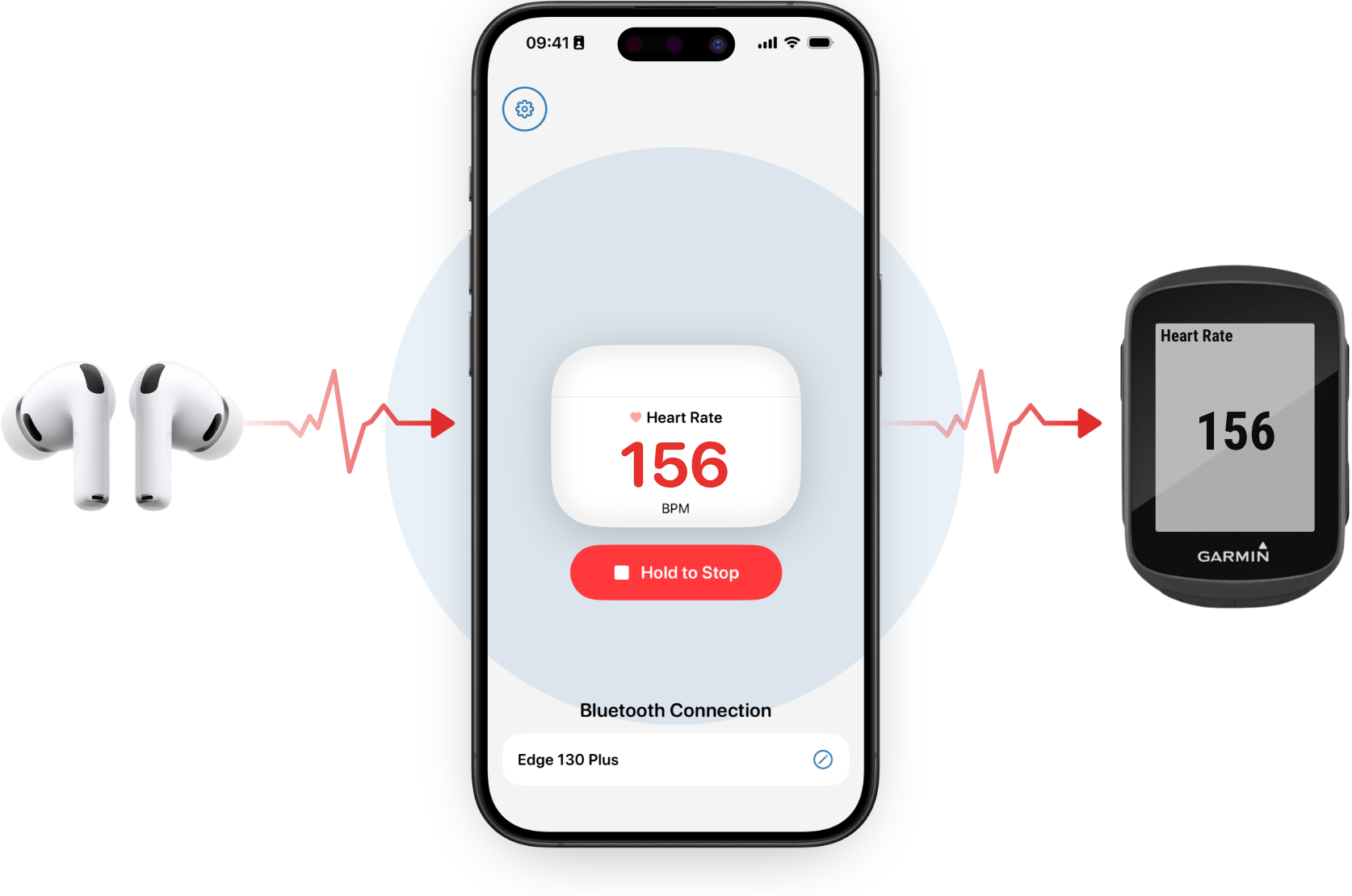
AirHRM reads heart rate from your AirPods and broadcasts it as a standard Bluetooth heart rate sensor — the same signal a chest strap sends, readable by any equipment that accepts one.

Free 7-day trial, then $5.99/year
Simple by Design
Pair it once. After that, it's the same three moves before every session.
AirPods In, Tap Start
Open AirHRM on your iPhone and tap Start. That's what makes your phone visible as a heart rate sensor.
Pair Your Equipment
On your Garmin, Peloton, Concept2, treadmill, or any other equipment — search for a heart rate sensor and select AirHRM.
Train, Then Tap Stop
Your heart rate streams in the background. Lock your phone, pocket it, and go.
One Job. Done Well.
For anyone who trains with AirPods and equipment that reads heart rate.
Works in the Background
Lock your phone or switch apps — AirHRM keeps broadcasting in the background.
Heart Rate on Your Lock Screen
Your live heart rate stays visible on the Lock Screen and Dynamic Island throughout your session. No need to unlock.
No Duplicate Tracking
No analytics, no zones. Your equipment handles that. AirHRM just bridges heart rate.
Works through Long Workouts
Battery use is in line with a normal phone workout session.
Works with Your Gear
Cycling computers, Peloton, Concept2 PM5, NordicTrack and other iFit machines, treadmills, ellipticals, gym cardio consoles, and indoor training apps on a second device — if it pairs to a standard Bluetooth heart rate sensor, it works. Phones behave a bit differently than chest straps; check the list if you're unsure.
Your Device Isn't Listed?
If your device supports BLE heart rate sensors, just give it a try — the 7-day free trial is risk-free. Follow the general pairing guide to get started. Either way, if you find out it works or doesn't work, let me know and I'll add it to the list:
From Cyclists
This app is amazing!
★★★★★
Finally don't need a chest strap for accurate HR on my Garmin — the AirPods integration just works. Huge upgrade for my setup.
AME9229 · Garmin Edge Explore
Works perfect with my Hammerhead Karoo 2
★★★★★
Works perfect and lets me add heart rate to my commute rides. Support is superb as well. Love it.
t_al · Hammerhead Karoo 2
Clever app that solves a problem
★★★★★
I have the Garmin Edge 130 and I followed the setup video and it works seamlessly. Really glad I don't have to wear an additional HR monitor to get this data into Garmin.
Gabriel B. · Garmin Edge 130
Ready to Leave the Chest Strap at Home?
after your trial ends
Less than a 3-pack of batteries.
Cancel before the trial ends and you won't be charged.
Frequently Asked Questions
What devices work with AirHRM?
Any equipment that pairs to a standard Bluetooth Low Energy heart rate sensor: Garmin Edge, Wahoo ELEMNT, Hammerhead Karoo, Peloton Bike and Tread, Concept2 PM5, NordicTrack and iFit machines, treadmills and ellipticals with BLE consoles, many commercial gym machines, and Zwift or other training apps on a second device — model and firmware vary.
Not everything is compatible — check yours here before subscribing.
Does it work with Garmin Connect at the same time?
Most Garmin Edge units only allow one Bluetooth connection to your iPhone for phone features. You often choose between AirHRM or Garmin Connect live features during a session.
The Garmin guide has the workaround — it becomes routine quickly.
Do I need to keep the iPhone app open?
No. After your equipment connects, you can lock the phone or switch apps. AirHRM keeps broadcasting in the background until you tap Stop.
Is there a free trial?
Yes — seven days free. You are not charged if you cancel before the trial ends.
What do I need to use AirHRM?
An iPhone running iOS 26 or later, AirPods that share heart rate with Apple Health, and the AirHRM app.